Streamline Your Hotel Operations with HotelPro Dashboard
Running a hotel, resort, or any accommodation business involves juggling countless moving parts—room availability, guest check-ins, housekeeping schedules, billing, and revenue tracking. When your tools feel clunky or disjointed, even simple tasks eat into your day. That’s exactly the kind of friction the HotelPro Hotel Management Dashboard was built to eliminate. It’s a premium landing page template crafted specifically for hospitality businesses that need a clean, intuitive way to visualize and manage their operations.
Whether you're a hotel owner looking to modernize your booking system, a designer building a platform for a hospitality client, or a developer assembling an accommodation management interface, this template gives you a polished starting point. The layout feels professional without being sterile—there's a warmth to the design that fits the hospitality industry naturally. You won't find generic corporate aesthetics here. Instead, the visual language speaks to comfort, service, and guest experience.
What Makes This Dashboard Design Stand Out
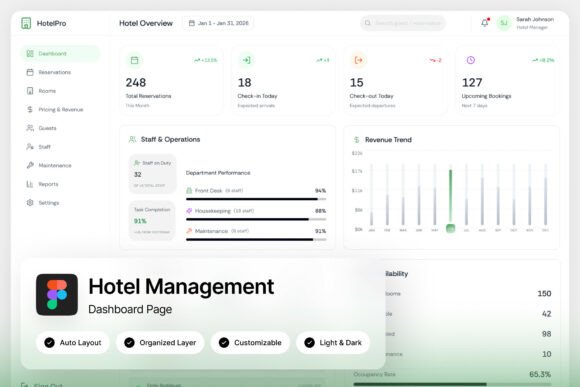
First impressions matter, especially when your dashboard is something your team will interact with every single day. HotelPro delivers two high-quality admin dashboard screens at 1440×1024 pixel resolution, giving you a generous canvas to work with. The design is pixel-perfect, meaning alignment, spacing, and proportions have been carefully considered so everything feels intentional rather than thrown together.
One of the most practical features is the inclusion of both light and dark mode interfaces. Hotels operate around the clock—front desk staff working the night shift will appreciate a darker interface that's easier on the eyes, while daytime managers might prefer the brightness of a light theme. Having both options ready to go means you don't have to build a second version from scratch.
The layers are well-organized, named, and grouped logically. If you've ever opened a design file only to find hundreds of unlabeled layers stacked chaotically, you know how valuable this is. Whether you're making minor tweaks or overhauling sections, the file structure keeps you efficient. Every element is fully customizable, so adjusting colors to match a hotel's brand palette or reorganizing sections to prioritize different metrics takes minutes, not hours.
Real-World Applications for Hospitality Businesses
Think about the range of businesses that could benefit from a dashboard like this. Boutique hotels managing 20 rooms have different needs than resort complexes with multiple buildings and amenities, but both need clarity in their data presentation. HotelPro's layout accommodates various scales because it focuses on presenting information in digestible chunks rather than overwhelming users with dense tables.
For property management companies overseeing several locations, a dashboard template like this becomes a foundation for building a unified system. You can customize each view to reflect individual property branding while maintaining a consistent interface structure. Staff at different locations learn one system instead of adapting to completely different layouts, which reduces training time and errors.
Online travel agencies and booking platforms can also adapt the template for their admin panels. The modern UI design translates well beyond traditional hotel management—vacation rental managers, hostel operators, and even co-working space administrators could modify the layout to suit their specific operational needs.
Design Details That Support Daily Workflows
Good dashboard design isn't just about looking polished—it's about reducing cognitive load. HotelPro uses clear visual hierarchy so the most important information naturally draws your eye first. Revenue summaries, occupancy rates, and upcoming reservations are positioned where they're immediately visible without scrolling or digging through menus.
The typography choices reinforce readability across both interface modes. Google Fonts are included, and the font links are provided in a separate text file so you can quickly load them in your project. Readable type matters enormously in a data-heavy interface. Numbers, dates, and guest names need to be legible at a glance, and the typefaces selected here support that requirement without sacrificing style.
Color usage throughout the template feels deliberate. Accent colors highlight actionable items and alerts without creating visual noise. Status indicators for room availability, maintenance requests, and guest feedback use intuitive color coding that new staff members can pick up quickly. These aren't arbitrary design decisions—they're choices grounded in how people actually process information under pressure.
Customization Without the Headache
The Figma file format means you're working with one of the most collaborative design tools available. Multiple team members can access and edit the file simultaneously, leave comments, and track changes. If your design team uses Figma for other projects, integrating HotelPro into your existing workflow is seamless.
Customization goes beyond swapping colors and logos. The modular layout structure lets you rearrange dashboard components to match your specific reporting priorities. Maybe your property cares most about guest satisfaction scores and online reviews—those widgets can move to the top. Perhaps seasonal revenue tracking is your primary concern during peak booking months—reposition those charts front and center.
The included help guide walks you through the file structure and editing process, which is especially useful if you're a business owner who's comfortable with design tools but not necessarily a professional designer. You don't need to be a Figma expert to make meaningful customizations. The guide covers the essentials so you can get your personalized dashboard up and running without guesswork.
Building a Cohesive Brand Experience
A hotel's digital presence extends far beyond its website. From the booking confirmation email guests receive to the interface your staff uses daily, every touchpoint shapes perception. When your internal tools look as refined as your guest-facing materials, it signals professionalism throughout the organization.
HotelPro's elegant hospitality-focused layouts make it easier to maintain visual consistency across platforms. The design language—clean lines, balanced white space, warm yet professional color options—translates naturally to other brand assets. You might pull design elements from the dashboard into your social media graphics, email templates, or printed materials for a unified look.
For design agencies serving hospitality clients, having a template like this in your toolkit accelerates project timelines. Instead of building an admin dashboard from zero, you start with a professionally designed foundation and customize it to each client's specifications. The time saved can go toward refining the guest experience, developing marketing materials, or onboarding new properties.
Practical Considerations Before You Download
A few things worth noting: the preview images shown in the product listing are for demonstration purposes and aren't included in the download. You'll need to source your own photography and imagery, which actually works in your favor—real photos of your property, your staff, and your guests will make the dashboard feel authentic rather than templated.
The template is designed at 1440×1024 resolution, which works well for standard desktop monitors used at front desks and back offices. If your team primarily uses tablets or smaller screens, you may need to adapt certain sections. The Figma file's organized layer structure makes responsive adjustments more manageable, though it's worth factoring this into your planning.
Licensing is straightforward for commercial use, so whether you're implementing this for your own business or building a solution for a client, you're covered. Just review the specific terms included with your purchase to ensure your intended use aligns with the license.
Ultimately, HotelPro Hotel Management Dashboard offers something genuinely useful for anyone working in or serving the hospitality industry. It bridges the gap between functional data management and thoughtful design, proving that operational tools don't have to feel utilitarian. When your dashboard feels good to use, your team works more confidently, and that confidence carries through to every guest interaction.