Smart Object Replacement: Streamline Your Instagram Workflow
That moment of dread when you open your design software, ready to create a week's worth of Instagram content, and realize you have to start from absolute zero. Again. The blank canvas stares back, the clock is ticking, and the creative energy you needed for actual ideas is already spent wrestling with layouts and dimensions. For anyone managing a brand's visual presence—whether you're a solopreneur, a social media manager, or a designer juggling clients—this repetitive drain is a familiar enemy. What if you could bypass the setup and dive straight into the creative part? This is where a thoughtfully designed template system, built around a core feature like Smart Object Replacement, fundamentally changes your process.
Beyond a Single Template: A System for Consistent Visuals
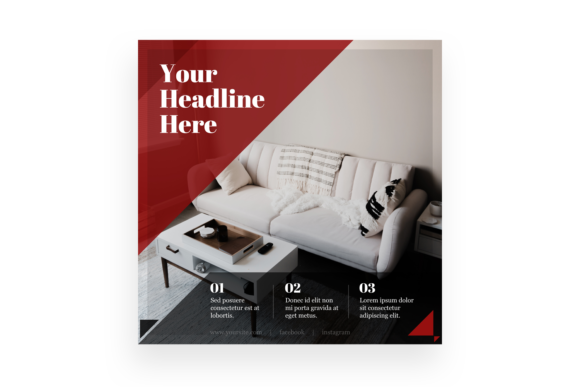
The Multipurpose - Instagram Post template isn't just another static design file. It's a foundational tool engineered for efficiency and brand cohesion. At its heart lies the power of Adobe Photoshop's Smart Object technology. Think of a Smart Object as a protected, editable container within your main design. You place your image, your quote, or your graphic element into this container once. Then, with a simple double-click and a save, every single instance of that Smart Object across your entire template suite updates automatically. Need to swap a product photo in five different post layouts? Change it once in the master Smart Object, and all five designs refresh instantly. This eliminates the soul-crushing task of manually replacing elements one by one, ensuring pixel-perfect consistency and saving you hours each week.
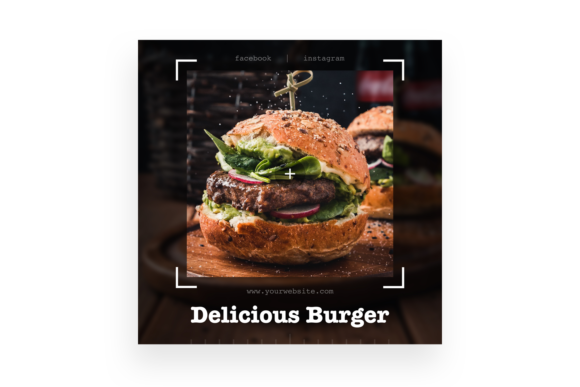
This system is built for real-world use. The 3000x3000 pixel canvas at 300dpi gives you professional-grade resolution suitable for both crisp on-screen display and high-quality print reproduction for posters or merchandise. The organized, labeled layers in the PSD CS5+ file mean you're not digging through a chaotic mess to change a color or adjust text. You're working with a clean, logical structure. You get the PSD file, a preview JPG to see the final look, and clear documentation with the Read Me and Credits files. It’s a complete package designed to get you creating, not troubleshooting.
Practical Applications: From Branding to Batch Content
The true value of this asset is its flexibility. Its clean, modern aesthetic acts as a neutral yet polished canvas for countless projects. A small business owner can use it to establish a recognizable visual rhythm for their Instagram feed, ensuring every post—from customer testimonials to new product launches—feels part of the same family. This consistency is crucial for brand recognition in a crowded social space.
For content creators and bloggers, it’s a batch-creation powerhouse. Plan and design an entire month of quotes, tips, or promotional graphics in a single session. The template's structure guides your layout, freeing you to focus on the message and imagery. Marketers can rapidly produce A/B test variants for ad campaigns, changing only the headline or call-to-action button within the Smart Object to see what resonates best. The applications extend far beyond social media:
- Digital Products & Lead Magnets: Design matching Instagram graphics to promote a new eBook or webinar, then use the same visual language for the eBook's interior pages or slide deck.
- Event Invitations & Announcements: Create a suite of coordinated visuals for a workshop or sale, from the initial "Save the Date" post to the final "Last Chance" reminder.
- Packaging Mockups: Use the high-resolution canvas to mock up how your product label or packaging design would look in a lifestyle social media context before going to print.
- Editorial Layouts: Design cohesive story highlights or carousel posts that tell a visual narrative with a consistent typographic and compositional style.
Designing with Intention: Pairing and Professional Polish
While the template provides the skeleton, the soul of your design comes from your typography and imagery choices. This is where strategic thinking meets creativity. The template’s clean lines make it an excellent partner for a wide range of typefaces. You might pair it with a bold, modern display font for impact headlines, or a elegant serif font for a more classic, authoritative feel. A flowing script font could add a personal, handwritten touch for quotes or signatures. The key is to choose a premium font with a clear commercial license that aligns with your project's scale—whether it's for a personal blog or a client's global campaign.
Don't just slap your brand font onto the template and call it done. Use this as an opportunity to refine your font pairing. Test how a sturdy sans serif font for body copy interacts with a distinctive display font for headers. Consider readability first; a beautiful, ornate script will fail if it's too small to read on a mobile screen. The organized layers allow you to easily adjust sizing, spacing, and color to achieve the perfect balance. This process isn't just about making things look good—it's about professional presentation that builds trust and enhances audience engagement. A visually cohesive and polished feed signals credibility and care, which is a powerful subconscious message to potential customers or followers.
Maximizing Your Asset: A Practical Workflow
To get the most out of this template, integrate it into a streamlined workflow. Start by customizing the master color scheme and typography to match your brand's identity. Save these as your default. Then, for each new content batch, duplicate the PSD file and rename it for the project (e.g., "April_Promos"). Open the Smart Objects and begin populating them with your core content—product images, portrait photos, key headlines.
Remember the included assets. The Preview JPG is your quick reference for the intended final look. The Credits.txt is essential; it lists the fonts and images used in the preview, ensuring you can legally source them for your own work if you wish to replicate the exact style. This transparency is a hallmark of a professional design asset. By treating this template not as a one-off file but as a component in your brand identity toolkit, you build a scalable system. You turn the daily grind of content creation into a focused, efficient, and even enjoyable part of growing your visual presence. The result is more time for strategy, more energy for creativity, and a feed that looks intentionally crafted, not hastily thrown together.