Build Your Movie Streaming App Faster with This UI KIT
Starting a new mobile application project from absolute zero is a daunting task. You have the idea, maybe even the backend logic figured out, but staring at a blank canvas in Figma can bring any momentum to a halt. This is exactly why having a robust starting point isn't just a luxury—it's a necessity for meeting deadlines and maintaining creative energy. If you are looking to launch a video platform, a niche streaming service, or a media player, the Movie Stream Application Mobile UI KIT offers a comprehensive solution that bridges the gap between concept and execution.
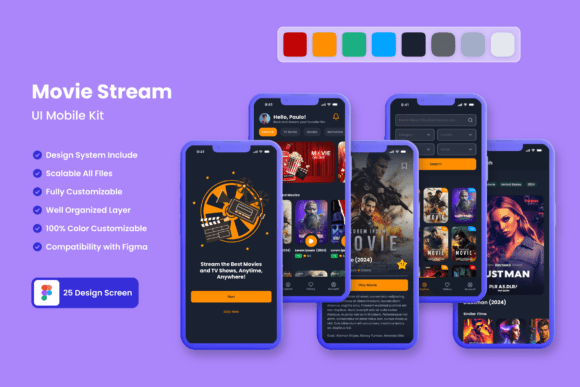
Designed specifically for the entertainment industry, this kit provides 25 high-quality templates that cover the essential screens you need to get an app off the ground. It’s not just about having a "movie app" look; it’s about having a structured, professional foundation that allows you to focus on the user experience rather than drawing basic rectangles and grids. Whether you are a startup founder trying to visualize your Minimum Viable Product (MVP) or a freelancer looking to speed up your workflow, this resource is built to be immediately practical.
A Visual Language Built for Entertainment
Streaming applications live and die by their visual hierarchy. Users need to find content quickly, distinguish between genres, and understand playback controls intuitively. The Movie Stream Application Mobile UI KIT addresses this by utilizing a modern aesthetic that prioritizes content display. The templates are pixel-perfect, ensuring that your typography, spacing, and imagery look crisp on high-resolution screens.
One of the standout features is the sheer volume of resources included. With 80+ UI elements and 100% vector layers, you aren't just getting static screens; you are getting a modular design system. This means you can mix and match components—like buttons, rating systems, and navigation bars—to create unique layouts that weren't originally in the pack. Because the vectors are fully scalable, you can resize these elements for tablets or web interfaces without losing quality. It’s a versatile toolkit that adapts to your specific creative direction.
Practical Applications: From Prototype to Product
While the primary use case is mobile app development, the utility of these templates extends far beyond just the final application build. For entrepreneurs and marketers, these high-fidelity designs serve as powerful marketing assets. Before you write a single line of code, you can use these screens to create realistic mockups for investor presentations, crowdfunding campaigns, or landing pages.
Consider the impact on your brand identity. By using the customizable features in Figma, you can instantly apply your brand's color palette and typography to the entire kit. This allows you to see exactly how your logo and brand guidelines interact with the UI. You can generate social media graphics that look like actual app screenshots, creating a cohesive visual story across Instagram, Twitter, and LinkedIn. Furthermore, the clean layouts are perfect for editorial design if you are writing case studies or blog posts about your upcoming tech product. The kit essentially acts as a bridge between your digital products and your external marketing efforts.
Customization and Workflow Efficiency
A template is only as good as its ability to be changed. The creators of this kit clearly understood that no two projects are alike. The files are available for Figma, a tool favored by modern design teams for its collaborative features. The templates are fully layered and organized, which means you won't waste time hunting through a mess of unnamed groups to find the icon you want to change.
The inclusion of symbol objects is a massive time-saver. If you decide to change the style of the "Play" button halfway through the design process, you can update the master component, and it will reflect across all 25 screens instantly. This level of organization mirrors professional web design and development workflows, making it easier for designers to hand off files to developers. Additionally, the kit includes free font resources and icon vectors, ensuring that you have a complete visual package without needing to hunt for additional assets. The ability to easily change color styles means you can create dark mode and light mode variations in minutes, catering to the modern user's preference for visual comfort.
Designing for User Retention and Engagement
In the crowded market of premium fonts and design assets, functionality is king. However, in the streaming world, engagement is the queen. The layouts provided in the Movie Stream Application Mobile UI KIT are designed to encourage scrolling and discovery. Elements like "Continue Watching," "Trending Now," and "Cast Details" are placed where the user expects them, reducing friction.
When you customize these templates, you are building on a foundation of established UX patterns. This helps improve readability and professional presentation. For example, the typography pairings suggested in the templates offer a balance between bold headings (for movie titles) and legible body text (for descriptions). This contrast is vital for keeping users on the screen. By utilizing the pre-made hierarchy, you ensure that your content is digestible, which is a key factor in audience retention. Whether you are designing a platform for indie films or a massive library of documentaries, the structural integrity of these screens supports better user flow.
Final Thoughts on Building Your Vision
Bringing a mobile application to life requires a balance of creativity and efficiency. You don't need to reinvent the wheel for every button or card layout; you need a high-quality starting point that you can make your own. The Movie Stream Application Mobile UI KIT provides that necessary leverage, offering 25 distinct screens that are ready to be molded into your specific vision.
It is a resource that respects the designer's time while providing the visual fidelity required to compete in the current market. By integrating these templates into your workflow, you can move from the ideation phase to a polished, interactive prototype much faster. It’s a practical, scalable, and visually compelling toolkit for anyone serious about building a media-centric mobile experience.